

Smart AC Basic 10A Switch | 85~265VAC and 433MHz RF | Tuya Smart Life
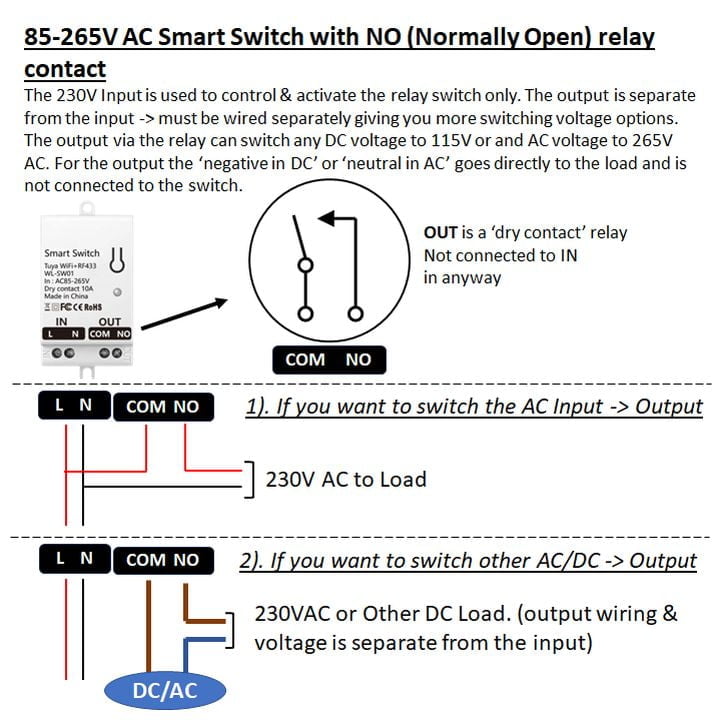
A Smart 10A Basic Switch is a versatile automation component designed to act as a remote-controlled relay. Unlike standard smart switches that output the same voltage they receive (wet contacts), a dry contact switch keeps the input power and the output circuit completely isolated.
How does the dry contact work?
Think of the device as having two distinct “sides”:
- The power side: connected to a constant power source.
- The contact side: two terminals that are labeled as COM and NO (normally open) act exactly like a manual wall switch.
Product features
- Dry contact relay: the switching mechanism is isolated from the device’s internal power supply. This allows you to switch different voltages or simply “close a loop” without introducing any new current into the target circuit.
- Scheduling and timers: set automated routines to run high-energy devices during off-peak hours to save on electricity costs.
- Voice control: integration with assistants like Amazon Alexa or Google Assistant for hands-free operation.
Specifications
- Model: WL-SW01
- Input voltage: 85~265VAC @ 50/60Hz
- Output current: <10A
- Wireless protocol:
- WiFi (2.4GHz)
- Bluetooth
- 433MHz
Please see the link to the 433MHz remotes we have available.
- 433MHz remote | Short and Long Range [click here]
- 4-Channel 433MHz Remote | Long Range [click here]
- 8-Channel 433MHz Remote | Long Range [click here]
- 12-Channel 433MHz Remote | Long Range [click here]
Pairing the remote to your smart device
There are normally two ways of pairing the remote to your smart device.
- Method 1: pair the remote via the app.
- Step 1: download the Tuya smart app and pair your smart device to your smartphone.
- Step 2: go into the smart device in the app. Tap on settings (that is on the bottom right-hand corner).
- Step 3: you should see a category called RF remote set-up. Tap on it.
- Step 4: tap on add remote, it will count down from 10 seconds. During the countdown, press any button on your 433MHz remote to connect to the smart device.
- Step 5: test the remote to see if the smart device switches on or off.
- Method 2: pair the remote physically.
- Step 1: press and hold the 433MHz remote button for ±3 seconds.
- Step 2: while hold the remote button, press the smart device’s on or off button. It should have paired successfully.
- Step 3: test the remote to see if the smart device switches on or off.
Typical applications (not limited to)
- Gate and garage door openers: most gate motors use a ‘pulse signal’ to trigger movement. A dry contact can safely bridge the motor’s trigger terminals without sending high-voltage AC into the control board.
- Boiler and HVAC control: many heating systems use low-voltage “call-for-heat” loops.
- Intercom integration: it can be used to “press” the electronic release button on an existing intercom system remotely.
- Inching/momentary mode: support “inching,” where the switch closes for 0.5 to 1 second and then automatically opens, mimicking a physical button press.
What is in the box?
- 1 x Smart 10A Basic Switch
- 1 x Mini screw driver
- 1 x Instruction manual
FAQ’s
- Why should I choose Tuya above all the other Smart Home Automation Platforms? [click here]
- How do I get started? [click here]
- What devices can presently be Smart Automated? [click here]
Home Automation made Smart, Simple, and Affordable via the Tuya Smart Life App (Android or iOS), offering the fastest, most stable platform and the widest range of Smart Products. Supports Alexa Echo Dot, Google Home, and IFTTT, and more…


John Schofield (verified owner) –